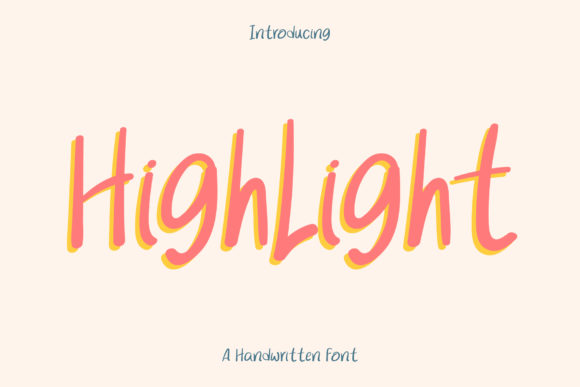
Highlight: A Handwritten Font for Makers
The morning light was just hitting my workbench when I opened the file for Highlight. I had been struggling with a batch of soy candle labels that felt too stiff. The sans serif options were clean but cold, and the overly loopy scripts were hard to read at a glance. I needed something that felt like a friend writing a note—casual, warm, and inviting. That is exactly what this typeface delivered. As a maker who spends hours perfecting wick centers and mixing scents, I know that the visual presentation is just as important as the product inside the jar. Highlight brought that missing human touch to my packaging design instantly.
This font belongs to the Script Amp collection, a category of Fonts that prioritizes personality and ease of use. It is not trying to be perfect. In fact, its charm lies in its slight quirks and relaxed structure. For handmade sellers, this imperfection is a feature, not a bug. It signals authenticity. When a customer picks up a item wrapped in paper adorned with Highlight, they subconsciously register that a real person created it, not a faceless factory machine. This emotional connection is vital for building brand identity in a crowded marketplace.
Bringing Warmth to Product Labels and Packaging
One of the most practical applications for this typeface is on product labels. Whether you are creating stickers for lip balms, tags for handmade soaps, or seals for bakery boxes, readability and style must coexist. Highlight strikes a beautiful balance here. It is legible enough for short phrases like "Hand Poured," "Small Batch," or "With Love," yet decorative enough to serve as the primary logo element for a boutique brand.
I recently tested it on a set of kraft paper tags for a holiday gift guide. The font’s natural rhythm meant I did not have to spend hours adjusting kerning manually. The letters flow into each other with a gentle cadence that mimics actual handwriting. This saves time during the design phase, allowing me to focus on other aspects of my shop, such as photography and inventory management. For cutting machine users, such as those with Cricut or Silhouette devices, the clean lines of the font make it relatively easy to weed, provided you size it appropriately. Thick connections prevent the delicate parts from tearing during application, which is a common frustration with thinner script fonts.
Elevating Stationery and Digital Printables
Beyond physical goods, Highlight shines in the world of stationery and digital downloads. If you design wedding invitations, birthday cards, or planner pages, this font adds a layer of sophistication without feeling formal or intimidating. I used it for a set of printable wall art quotes, pairing it with a simple, geometric sans serif font for the body text. The contrast between the structured sans serif and the organic flow of Highlight created a modern typography look that felt fresh and editorial.
For printable creators, the versatility of this font is a major asset. It works beautifully for titles on worksheet covers, headers in digital planners, and decorative elements in social media graphics. Because it is a display font, it commands attention without shouting. It invites the viewer to pause and read. This is crucial for engagement on platforms like Instagram or Pinterest, where visual appeal stops the scroll. Using Highlight in your mockups can help potential customers visualize how the final printed product will feel in their hands.
Readability and Design Best Practices
While Highlight is incredibly versatile, it is important to understand its strengths. It is best suited for short phrases, names, titles, and decorative wording. It is not designed for long paragraphs of body text. Trying to force it into lengthy descriptions will reduce readability and diminish its impact. Think of it as the cherry on top of your design sundae. Use it to highlight key information, such as the product name on a mug, the date on a save-the-date card, or the main message on a tote bag.
When using this font for small stickers or tiny product labels, always test print at actual size. What looks clear on a computer screen can become muddy when shrunk down to a one-inch circle. Ensure there is enough contrast between the font color and the background. Dark ink on light paper, or vice versa, ensures that the quirky details of the letters remain visible. For merchandise like shirts or mugs, consider the fabric texture or surface curve. Highlight holds up well on curved surfaces because its letterforms are distinct and not overly condensed.
Pairing and Brand Consistency
Creating a cohesive brand identity often comes down to font pairing. Highlight pairs exceptionally well with clean, neutral typefaces. A light weight sans serif font allows the handwritten style to take center stage without competition. Alternatively, a classic serif font can add a touch of traditional elegance, making it suitable for wedding stationery or high-end boutique branding. Avoid pairing it with another busy script font, as this can create visual clutter and confuse the eye.
Consistency is key. Once you choose Highlight for your primary headings or logo, stick with it across all your touchpoints. Use it on your packaging, your website banners, your social media graphics, and your thank-you cards. This repetition builds recognition. Customers begin to associate that specific handwritten style with your unique voice and quality. It becomes part of your visual signature.
Licensing and Technical Considerations
Before integrating any new typeface into your commercial workflow, always review the licensing terms. Ensure that your purchase of Highlight includes the right commercial font license for the products you intend to sell. This typically covers physical items like t-shirts and mugs, as well as digital products like printables and templates. Check the included file formats to ensure compatibility with your design software. Most modern design tools support standard formats, but it is good to verify.
Also, explore the full character set. Look for alternates, ligatures, or swashes that might add extra flair to specific designs. Some versions of handwritten fonts include multiple weights or styles that can provide more flexibility. Understanding these technical details empowers you to get the most out of your design assets. It allows you to create varied looks while maintaining a consistent brand voice.
In the end, choosing a font is about more than aesthetics. It is about communication. Highlight communicates warmth, creativity, and care. It tells your customers that you value the personal touch. Whether you are labeling a candle, designing a wedding invite, or creating a digital planner, this font offers a reliable and charming way to express your brand’s personality. It is a tool that respects the handmade process, enhancing your work without overshadowing it. For makers who want their designs to feel as authentic as their craft, Highlight is a worthy addition to the toolkit.